
Ageing Australia Quality Management System Support Portal
General
Set up and configuration
- Assign required reading
- Manage app settings and notifications
- Home page image and document logo
- Manage categories
- Welcome text and news
- Hide items (archive content)
- Required reading reports
- Updating role name video
- Updating links to Strengthened Standards training video
- Onboarding kit
- Send email notifications
Manage users
Troubleshooting
Registers
Manage content
- Delete document
- Edit, review and approve process
- Edit, review and approve policy
- Create and publish new policy
- Create and publish new process
- Previous item version information
- Edit roles
- Edit release notes
- Hide items (archive content)
- Introduction to release management
- Manage document
- Manage regulations
- Publish multiple changes (in one release)
- Publish single item (manage changes)
- Download and print content
- Delete role
- Delete policy
- Delete process
- Delete or archive regulation
- Embed video
- Manage comments
- Send email notifications
- Show Remaining Articles (2) Collapse Articles
Audits
Training Resources
- Content updates training
- Process editing - editing the process sequence
- Upcoming training sessions
- Required reading training video
- Updating role name video
- Updating links to Strengthened Standards training video
- Scheduling updated audits video
- Work instructions training video
- Comments training video
Business units
Reports
Required Reading
Work Instructions
Mobile Phone App
Comments
Custom audits
< All Topics
Print
Submit a support query (QMS Mobile App)
Updated
Users can submit a support query directly in the QMS Mobile App.
Step 1
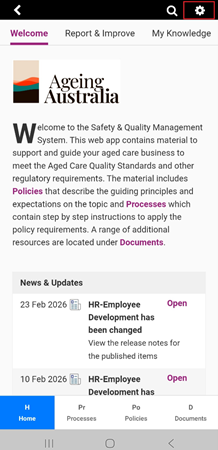
Open the mobile app and access the settings in top right corner. Your mobile app settings will appear.
Step 2
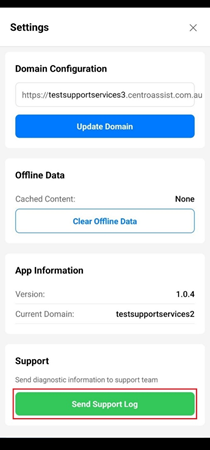
Tap Send Support Log.
Step 3
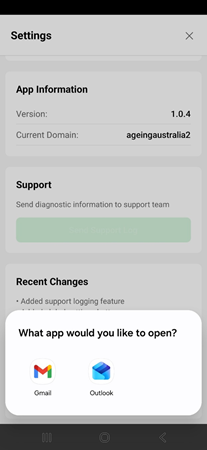
Tap on the icon to select your preferred email application. This will automatically generate an email template. You will be redirected to your email inbox.
Step 4
It will add some information about the system. Describe your issue at the end and send the email. This will send your query directly to the assigned system Administrator and Ageing Australia Quality Team.
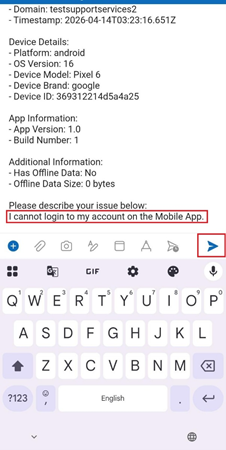
Table of Contents