General
Set up and configuration
- Assign required reading
- Manage app settings and notifications
- Home page image and document logo
- Manage categories
- Welcome text and news
- Hide items (archive content)
- Required reading reports
- Updating role name video
- Updating links to Strengthened Standards training video
- Onboarding kit
- Send email notifications
Manage users
Troubleshooting
Registers
Manage content
- Delete document
- Edit, review and approve process
- Edit, review and approve policy
- Create and publish new policy
- Create and publish new process
- Previous item version information
- Edit roles
- Edit release notes
- Hide items (archive content)
- Introduction to release management
- Manage document
- Manage regulations
- Publish multiple changes (in one release)
- Publish single item (manage changes)
- Download and print content
- Delete role
- Delete policy
- Delete process
- Delete or archive regulation
- Embed video
- Manage comments
- Send email notifications
- Show Remaining Articles (2) Collapse Articles
Audits
Training Resources
- Content updates training
- Process editing - editing the process sequence
- Upcoming training sessions
- Required reading training video
- Updating role name video
- Updating links to Strengthened Standards training video
- Scheduling updated audits video
- Work instructions training video
- Comments training video
Business units
Reports
Required Reading
Work Instructions
Mobile Phone App
Comments
Custom audits
Working example 1 – locking down content access to 2 separate items
Organisation Problem: We have two types of employees (Support Workers and Support Coordinator) who are required to have completely separate policies, processes and documents within Centro ASSIST. I want to:
- lock half the content down to one group and half the content down to the other group
- ensure that only employees in the relevant groups can see relevant content
- ensure that any users NOT in the group cannot see the content.
Tip
Users with Administration permission in the Centro web app have full access to all content at all times, even if content has been allocated to specific BUs.
Step 1
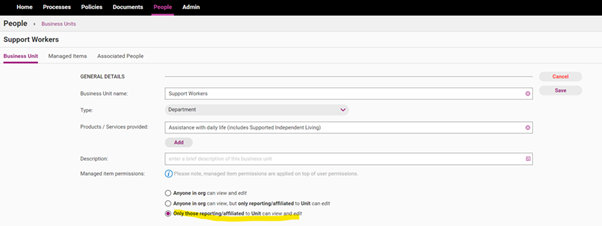
Create two Business Units under the People>Business Units tab. Ensure both Business Units are set with the Only those reporting/affiliated to Unit can view and edit option selected.
Step 2
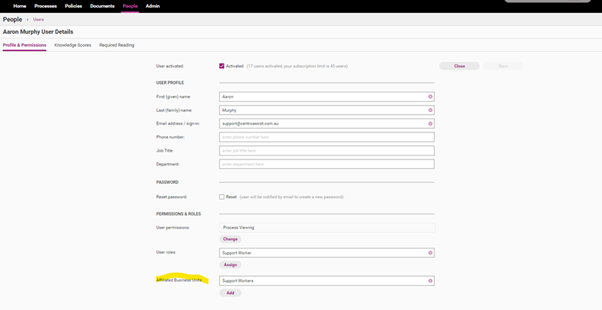
Assign your users to the relevant Business Units.
Step 3
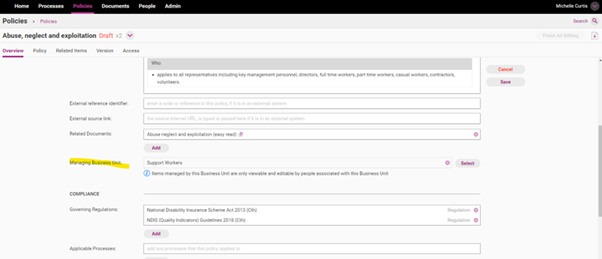
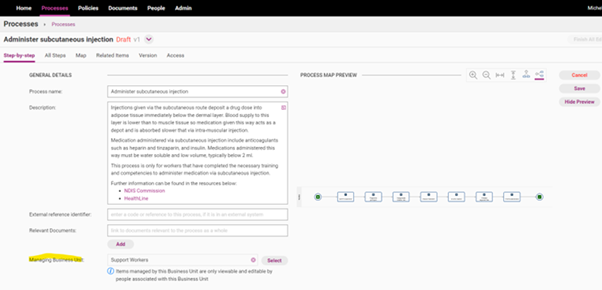
Edit all content items and assign your content to the relevant Business Units (example provided in policy and process screens). Please see Edit Policy guide for more details on this.
Policy example
Process example
Step 4
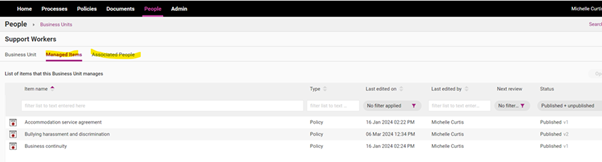
Review setup by going back into the People > Business Units tab and check the content that has been assigned to this group and the Associated People.