General
Set up and configuration
- Assign required reading
- Manage app settings and notifications
- Home page image and document logo
- Manage categories
- Welcome text and news
- Hide items (archive content)
- Required reading reports
- Updating role name video
- Updating links to Strengthened Standards training video
- Onboarding kit
- Send email notifications
Manage users
Troubleshooting
Registers
Manage content
- Delete document
- Edit, review and approve process
- Edit, review and approve policy
- Create and publish new policy
- Create and publish new process
- Previous item version information
- Edit roles
- Edit release notes
- Hide items (archive content)
- Introduction to release management
- Manage document
- Manage regulations
- Publish multiple changes (in one release)
- Publish single item (manage changes)
- Download and print content
- Delete role
- Delete policy
- Delete process
- Delete or archive regulation
- Embed video
- Manage comments
- Send email notifications
- Show Remaining Articles (2) Collapse Articles
Audits
Training Resources
- Content updates training
- Process editing - editing the process sequence
- Upcoming training sessions
- Required reading training video
- Updating role name video
- Updating links to Strengthened Standards training video
- Scheduling updated audits video
- Work instructions training video
- Comments training video
Business units
Reports
Required Reading
Work Instructions
Mobile Phone App
Comments
Custom audits
Guide ongoing business unit maintenance
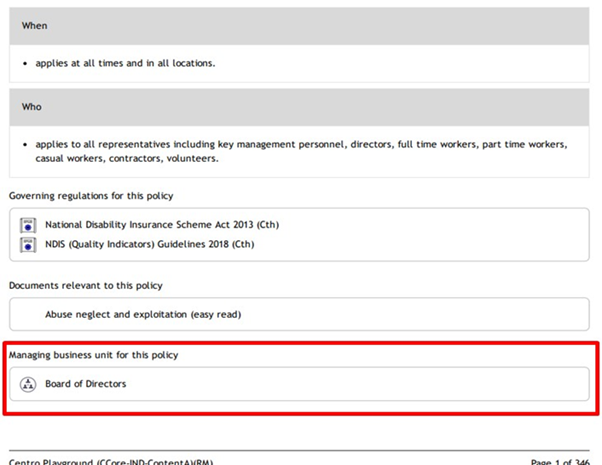
View BU information
This article applies to QMS customers, who have implemented BUs after the changes rolled out in March 2024. It covers steps and tips for maintaining your BUs.
Access the People tab, click on the Business Units subtab and review all content and associated people that have been assigned to the relevant Business Units.
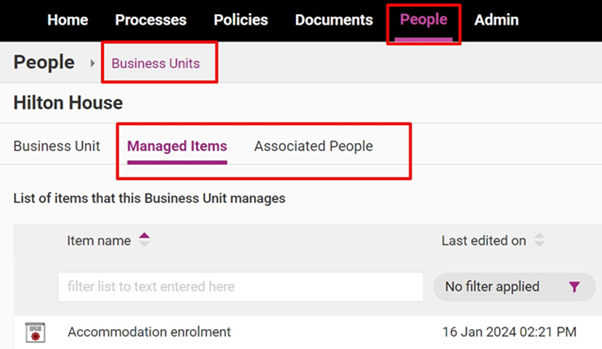
Managed Items
This tab provides a summary of each content item that has been assigned to the Business Unit, including last edited and next review dates. If you have selected the wrong content items to be assigned to this business unit, select ‘OPEN’ and follow step 3 in this guide to edit the item.
Associated People
This tab provides a summary of each team member that has been assigned to the selected Business Unit. This includes the level of access that has been granted based on the Business Unit settings and Position is setup.
Tip
If you have required reading, setting up business units may impact what different users can see.
It is recommended that the Administrator review any content that is completely locked down within a BU and check if any of these content items overlap with content assigned to a Role.
Review and edit BU
Tip
A BU can be created for a specific House (eg. Smith Street House), Facility (eg. Smith Family Services) or Department (Support Workers).
Step 1
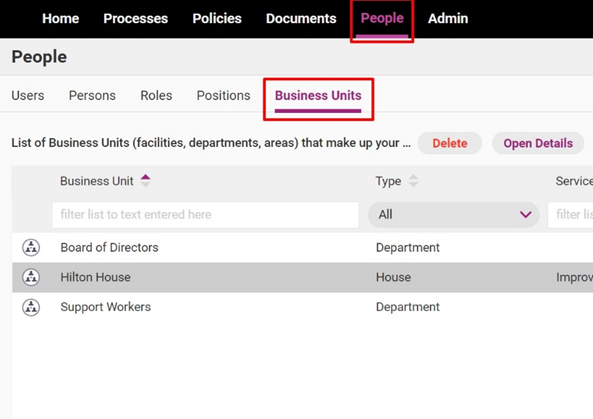
Access the People tab, click on the Business Units subtab. Double click on the BU you want to edit.
Step 2
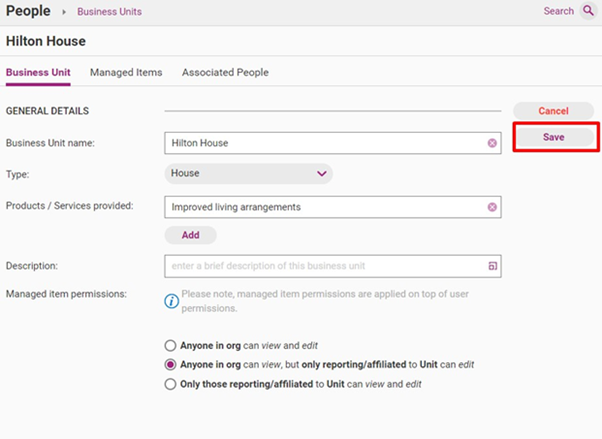
Click Edit and make required changes.
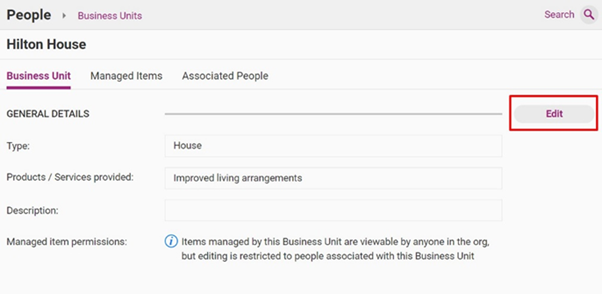
Field | Description |
|---|---|
Business unit name | The name of your business unit. |
Type | The type of business unit (i.e., House, Facility or Department) |
Products/services provided | A list of the services or products that the business unit provides |
Description | An overview of key information about the business unit. |
Managed item permissions | The viewing and editing permissions of the people linked to this business unit, options include:
|
Step 3
Click Save.
Tip
Once created, Business Units can be assigned to relevant content in the web app, including:
- Policies
- Processes
- Documents
- Work Instructions
- Regulations
- Register items (incidents, complaints, improvements feedback)
Initiate editing of relevant items to assign the Business Units to those items.
There will be no change to Internal Audits. This function already has the ability to select a Business Unit. All users with the permission set to ‘view/edit Internal Audits’ will continue to see all audits regardless of the BU selected.
PDF and Excel reporting
For more information regarding generating PDF or Excel reports from the web app, please see Download and Print Content guide.
Each generated PDF and Excel report has a field for BU information, which you can use for internal and external reporting purposes.