
General
Set up and configuration
- Assign required reading
- Manage app settings and notifications
- Home page image and document logo
- Manage categories
- Welcome text and news
- Hide items (archive content)
- Required reading reports
- Updating role name video
- Updating links to Strengthened Standards training video
- Onboarding kit
- Send email notifications
Manage users
Troubleshooting
Registers
Manage content
- Delete document
- Edit, review and approve process
- Edit, review and approve policy
- Create and publish new policy
- Create and publish new process
- Previous item version information
- Edit roles
- Edit release notes
- Hide items (archive content)
- Introduction to release management
- Manage document
- Manage regulations
- Publish multiple changes (in one release)
- Publish single item (manage changes)
- Download and print content
- Delete role
- Delete policy
- Delete process
- Delete or archive regulation
- Embed video
- Manage comments
- Send email notifications
- Show Remaining Articles (2) Collapse Articles
Audits
Training Resources
- Content updates training
- Process editing - editing the process sequence
- Upcoming training sessions
- Required reading training video
- Updating role name video
- Updating links to Strengthened Standards training video
- Scheduling updated audits video
- Work instructions training video
- Comments training video
Business units
Reports
Required Reading
Work Instructions
Mobile Phone App
Comments
Custom audits
Manage app settings and notifications
User access level | Powers related to Manage app settings |
|---|---|
Administrator / Model Administrator | Can manage the app settings. |
Accessing Admin > App Settings will give you the option to manage a variety of settings for your web app.
The options visible within your system’s App Settings will depend on what modules and preferences you have turned on. For instance, the Required Reading alert will not show if you do not have Required Reading turned on in your system.
If you believe something is missing, please contact our team at [email protected]
Change management
The Change Management section allows you to enter your preferred editing settings. The default setting is Release Manage and we recommend that this is retained.
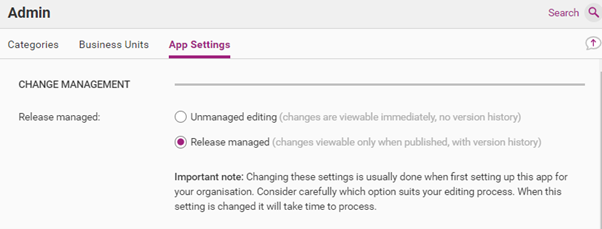
Editing setting | Description |
|---|---|
Unmanaged editing | Direct editing without release management features. |
Release management | Editing with full release management features. |
Important
Changing the settings to Unmanaged Editing will mean that there is no Publication History or previous versions recorded when changes are made.
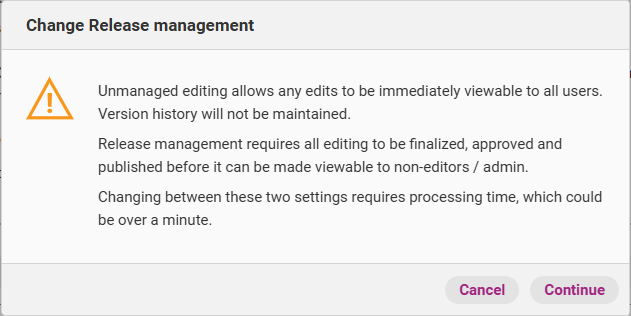
The following alert will pop-up when an Administrator attempts to change the Release Management settings. It will not be possible to change the setting if any content is not published (i.e. in draft, awaiting approval or awaiting publish).
Review Alerts
Tick the box, if you want to recieve review emails

Incidents and Complaints
The incidents and complaints section is visible only for those QMS subscribers who have the Registers Module.
Register Alerts
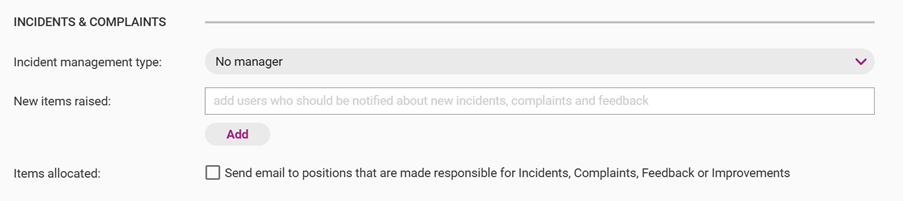
There are two types of alerts available for Registers:
- New Items Raised
Add Users here that should receive an email from the Centro system when any new Register Item is logged by any User. This email will be sent immediately. - Items Allocated
Tick this box so that any User linked to a Position that is made responsible for a Register Item will receive an alert email. This email will be sent after a delay of a few hours.
Incident Management Type
The Incident Management Type setting is used to determine what the Managing Business Unit will be for a Register Item. It is useful if the system is being set up to restrict visibility of Register Items.
There are 3 options under this setting:
- No Manager
No Managing Business Unit is set for the Register Items - Same as Business Unit identified in incident
The system will assign the Managing Business Unit to be the same as the Applies to Business Unit identified by the User who creates the Register Item. If this option is chosen, a default back up Business Unit must also be assigned in the case that the User does not enter an Applies to Business Unit. - A Business Unit
The system will assign a specific Managing Business Unit for all Register Items.

Important
Options 2 and 3 only applies for Users with Process Viewing access level as Incident Managers and above are able to manually enter the Managing Business Unit when creating the Register Item. Users with access other than Process Viewing are encouraged to add in the Managing Business Unit when the initially raise the Register Item
Required Reading
Use this tick box to direct the system to send a monthly email reminder to Users that have outstanding Required Reading tasks. The emails will be sent on the first of each month.

Internal Audit
Use this tick box to direct the system to send an email alert to Users who have been assigned Audits to complete, or if new Audits have been raised that any Audit Approver can complete. This email will be sent after a delay of a few hours.
