
Ageing Australia Quality Management System Support Portal
General
Set up and configuration
- Assign required reading
- Manage app settings and notifications
- Home page image and document logo
- Manage categories
- Welcome text and news
- Hide items (archive content)
- Required reading reports
- Updating role name video
- Updating links to Strengthened Standards training video
- Onboarding kit
- Send email notifications
Manage users
Troubleshooting
Registers
Manage content
- Delete document
- Edit, review and approve process
- Edit, review and approve policy
- Create and publish new policy
- Create and publish new process
- Previous item version information
- Edit roles
- Edit release notes
- Hide items (archive content)
- Introduction to release management
- Manage document
- Manage regulations
- Publish multiple changes (in one release)
- Publish single item (manage changes)
- Download and print content
- Delete role
- Delete policy
- Delete process
- Delete or archive regulation
- Embed video
- Manage comments
- Send email notifications
- Show Remaining Articles (2) Collapse Articles
Audits
Training Resources
- Content updates training
- Process editing - editing the process sequence
- Upcoming training sessions
- Required reading training video
- Updating role name video
- Updating links to Strengthened Standards training video
- Scheduling updated audits video
- Work instructions training video
- Comments training video
Business units
Reports
Required Reading
Work Instructions
Mobile Phone App
Comments
Custom audits
< All Topics
Print
Undertake audit
Updated
To complete internal audits, a user must have one of the following permissions in the Centro system:
- Audit Data Entry
- Audit Approval
- Model Administration
- Administration
Refer to Manage Users to change User access levels.
Download internal audit template
Step 1
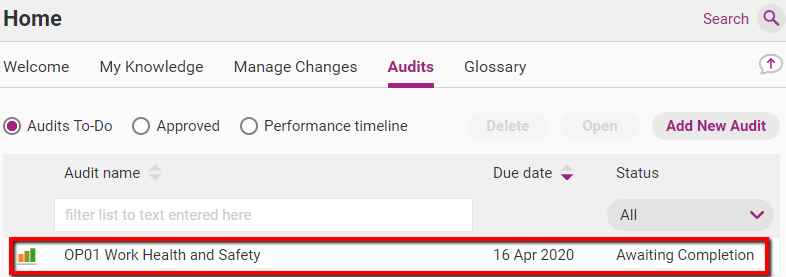
View all the internal audits that have been assigned to you in Home> Audits> Audits To - Do.
Find and double click the audit you want to complete.
Step 2
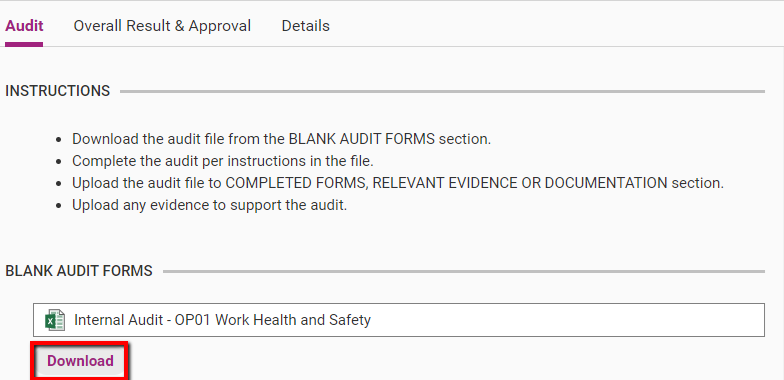
Download the internal audit form. You can download the form as many times as you like.
Tip
Save the internal audit form in an accessible place, as you will need to re-upload it into the web app after you are done.
Complete and save template
Step 1
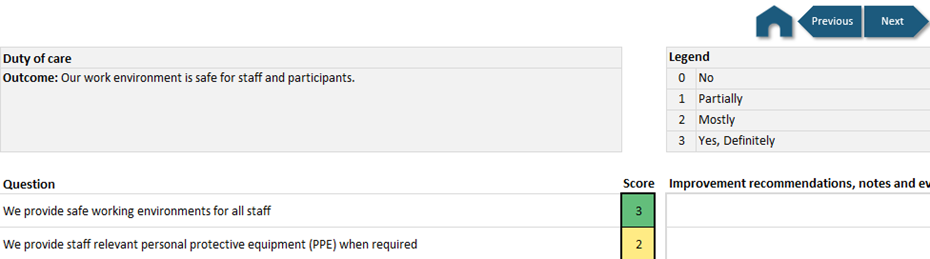
Complete the internal audit by navigating and following the instructions.
Step 2
When you have completed all relevant internal audit questions, your final score will be automatically displayed on the cover sheet of the audit form.

Table of Contents