
General
Set up and configuration
- Assign required reading
- Manage app settings and notifications
- Home page image and document logo
- Manage categories
- Welcome text and news
- Hide items (archive content)
- Required reading reports
- Updating role name video
- Updating links to Strengthened Standards training video
- Onboarding kit
- Send email notifications
Manage users
Troubleshooting
Registers
Manage content
- Delete document
- Edit, review and approve process
- Edit, review and approve policy
- Create and publish new policy
- Create and publish new process
- Previous item version information
- Edit roles
- Edit release notes
- Hide items (archive content)
- Introduction to release management
- Manage document
- Manage regulations
- Publish multiple changes (in one release)
- Publish single item (manage changes)
- Download and print content
- Delete role
- Delete policy
- Delete process
- Delete or archive regulation
- Embed video
- Manage comments
- Send email notifications
- Show Remaining Articles (2) Collapse Articles
Audits
Training Resources
- Content updates training
- Process editing - editing the process sequence
- Upcoming training sessions
- Required reading training video
- Updating role name video
- Updating links to Strengthened Standards training video
- Scheduling updated audits video
- Work instructions training video
- Comments training video
Business units
Reports
Required Reading
Work Instructions
Mobile Phone App
Comments
Custom audits
Send email notifications
User access level | Powers related to Manage app settings |
|---|---|
Administrator | Can send email notifications |
QMS users with administrator access can send email notifications to notify all other users in their organisation about content updates and other news.
If you have chosen to send several notifications they will all be combined into one email. All email notifications will be sent out at 5:30 am AEST/AEDT the day after you initially select to send them. For instance, if you send a notification from the web app on Monday, users will receive it at 5:30 am AEST/AEDT on Tuesday.
Send email notification while publishing changes
You have the option to send out an email notification when you publish new content. This applies when you:
- publish a single item
- delete a single item
- publish and/or delete multiple items at once.
Step 1
Reach the end of your release management workflow to access the release notes window.
Tip
For more information about release management, please refer to the article Introduction to Release Management.
Step 2
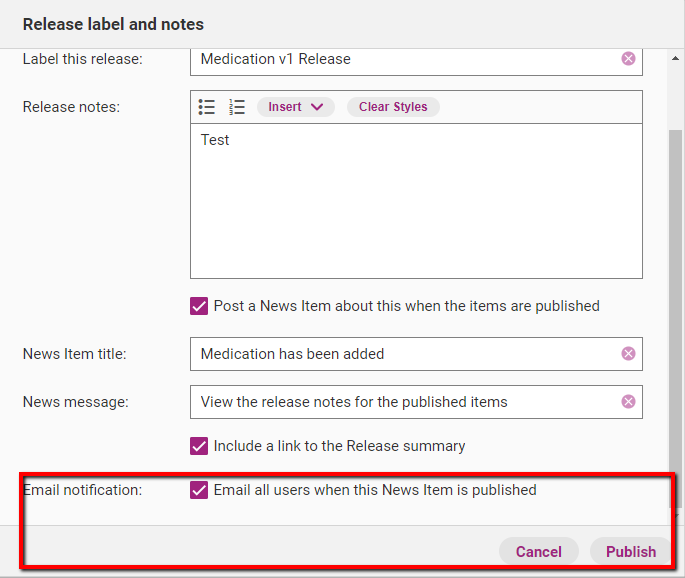
After you have filled out all other necessary information, scroll to the bottom of the release management window. Tick the box that says Email all users when this News Item is published. Click Publish. The email notification will be sent to all other web app users the following day.
Important
Please note, you must tick Post News about this when the items are Published to get the option to send an email notification.
Send a news item as an email notification
You can send any existing news item as an email notification.
Step 1
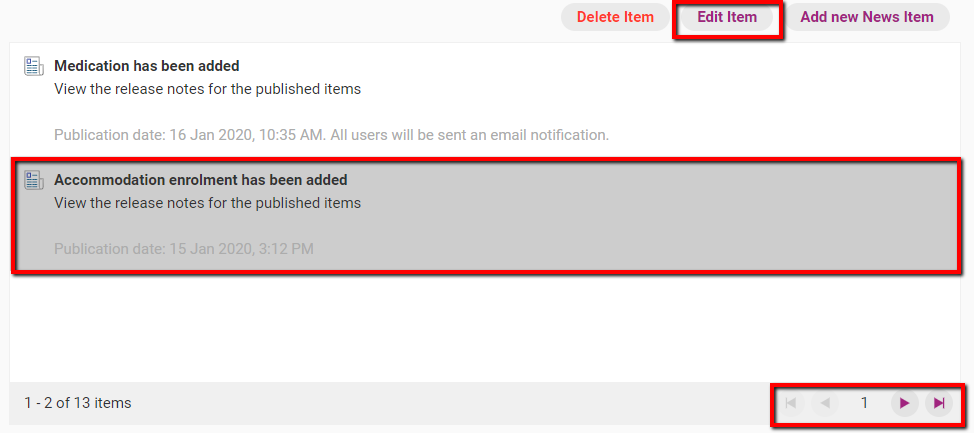
Access the Home tab and click Edit News.

Step 2
Use the navigation arrows to find the news item you want to send as an email. Click on the news item once and click Edit Item.
Step 3
Make necessary changes to the news item if required.
Step 4
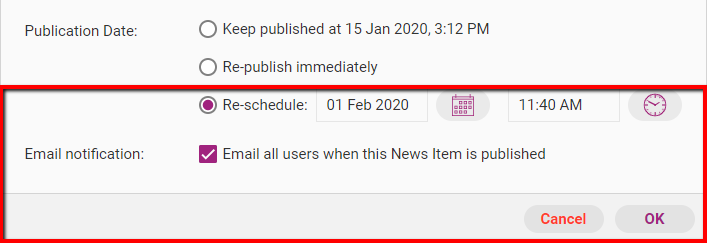
To send the news item as a notification, click either Re-publish immediately or Re-schedule. If you are rescheduling, select a date for when you want the news item to be published on the web app. Tick the box that says Email all users when this News Item is published and click OK to commit changes.
Important
If you have selected to reschedule the publication of a news item, the email notification will be sent at in the morning the day after the news item is published.
Administrator email notification settings
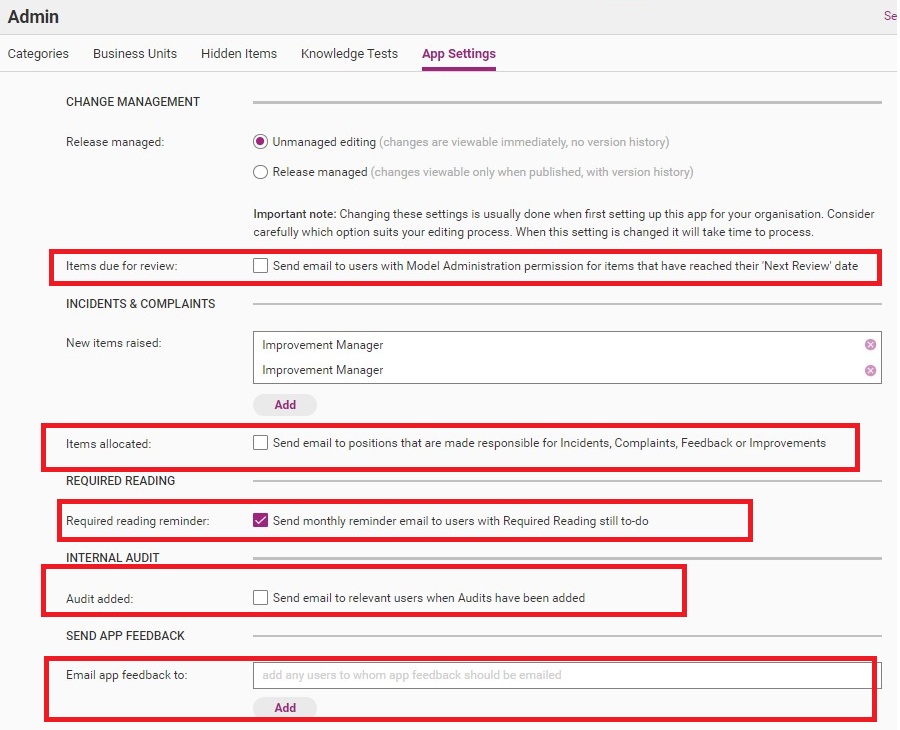
QMS users with Administration and Model Administration permissions can choose to send out a variety of other email notifications. Administrators can turn these notifications on and off in Admin>App Settings. For details refer to article Manage app settings.
A summary of these options is in the table below.
Email notification option | Description |
|---|---|
Items due for review | Email notifications sent to Administrators and Model Administrators at 6:10 AM AEST regarding items that are due for review that day. |
Items allocated | Email notifications about different register items (i.e. incidents, complaints, feedback and improvements) sent to different position holders within the system. These notifications are sent out to users with Incident & Improvement manager permissions that have a position assigned. Emails are sent out each day at 9pm AEST. |
Required reading reminder | Monthly email reminders to users that still have to complete required reading. |
Audit added | Email notification sent to relevant users when an internal audit has been assigned to them. |
Email app feedback to | QMS feedback sent to selected QMS users. |